There is a mail link in this page (left column). It generates a subject line which I now have put in myself. But is it possible to get the current URL in the subject line? Purpose: make clear in the subject line what the reaction/question is about.
If you use phplugins, something like this should work
// 1. Get the current URL
$protocol = (!empty($_SERVER['HTTPS']) && $_SERVER['HTTPS'] !== 'off') ? "https://" : "http://";
$current_url = $protocol . $_SERVER['HTTP_HOST'] . $_SERVER['REQUEST_URI'];

// 2. URL-encode it for the mailto link
$encoded_subject = rawurlencode("Check out this page: " . $current_url);


<!-- 3. Output the link in your HTML -->
echo '<a href="mailto:someone@example.com<?php echo $encoded_subject; ?>">
    Share this page via Email
</a>';
First: Thank You.
Second: I have never ever done anything with PHP so that could come from an alien planet. That being said: the first line of #1 is abracadabra but line 2 seems to make some sense and so logically #2 makes some sense to me as does #3 being close to HTML-home.
But… where and very much how do I implement those first two?

you need to add the code @Daniel provided via phplugins
1 Like
I assumed that you were already using phplugins. You would need to use the single page hook like single_bottom(). Have a look at this example: https://lab.danielleu.com/blog/customizing-single-page-view/
Another option would be to rewrite the mailto: link with javascript.
Add the following method to the user functions section of your existing Backlight PHPlugins PHP file. It uses the scripts() hook, which Backlight calls immediately before the closing </body> tag.
function scripts() {
    echo <<<'HTML'
<script>
(function () {
    function replaceEmailLink() {
        const placeholder = '___EMAIL_LINK___';
        const email = 'donald@donaldburghardt.photography';

        // Use the current page URL, excluding any URL fragment.
        const pageUrl = window.location.href.split('#')[0];
        const subject = 'Reaction/' + pageUrl;

        const link = document.createElement('a');
        link.href = 'mailto:' + email +
            '?subject=' + encodeURIComponent(subject);
        link.textContent = email;

        // Replace the placeholder wherever it occurs in the page text.
        const walker = document.createTreeWalker(
            document.body,
            NodeFilter.SHOW_TEXT
        );

        const textNodes = [];
        while (walker.nextNode()) {
            if (walker.currentNode.nodeValue.includes(placeholder)) {
                textNodes.push(walker.currentNode);
            }
        }

        textNodes.forEach(function (node) {
            const parts = node.nodeValue.split(placeholder);
            const fragment = document.createDocumentFragment();

            parts.forEach(function (part, index) {
                if (index > 0) {
                    fragment.appendChild(link.cloneNode(true));
                }
                fragment.appendChild(document.createTextNode(part));
            });

            node.parentNode.replaceChild(fragment, node);
        });
    }

    if (document.readyState === 'loading') {
        document.addEventListener('DOMContentLoaded', replaceEmailLink);
    } else {
        replaceEmailLink();
    }
})();
</script>
HTML;

    return false;
}
In your body text, replace your current mailto link with ___EMAIL_LINK___. This will be replaced by the script.
 AH! Yes… Why didn’t I think of that right away


Ok will try that this evening, thank you!
ok I got this: an error message in the top line. _EMAIL_LINK_ shows in the right column and is not clickable.
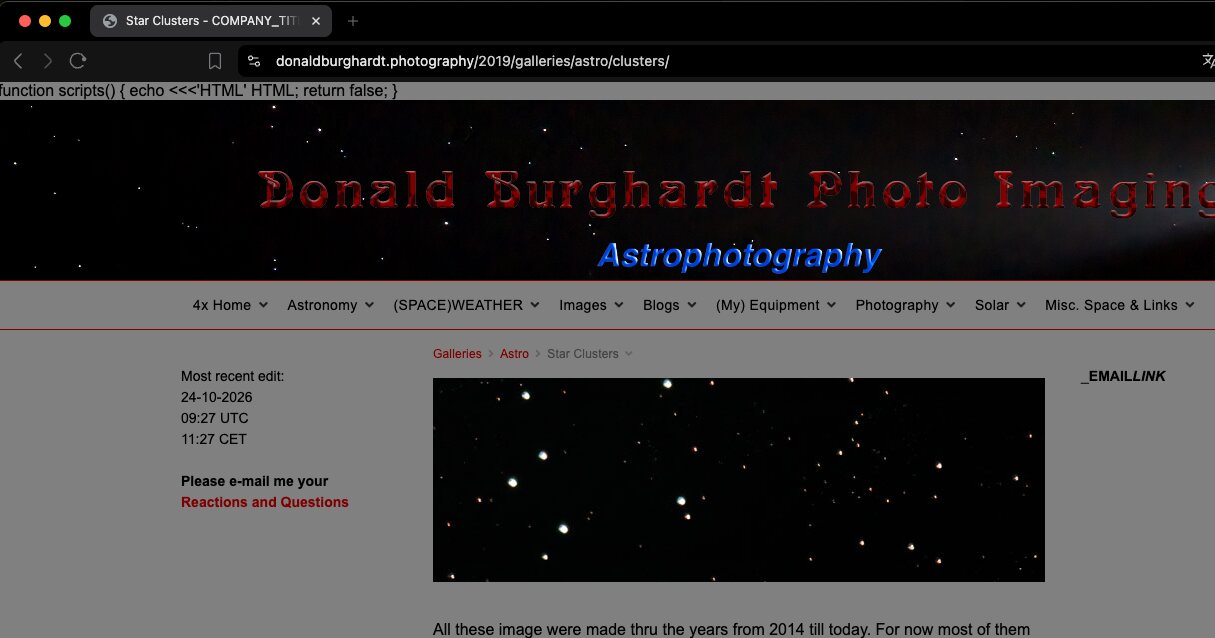
it looks as if your implementation of phplugins is incorrect.
Did you place the code @Daniel provided in the User Functions section of the phplugins-pangolin-sample.php file?
corrected that, now it is. The error message has gone but the rest unfortunately remains
Link to a page where the suggested mail link appears`;
https://www.donaldburghardt.photography/2019/galleries/astro/clusters/
It doesn’t look like you’ve replaced the mailto: link with ___EMAIL_LINK___.
If I understand correctly, your email link should look like this:
Please e-mail me your<br>
___EMAIL_LINK___
Or maybe this:
<p>Please e-mail your<br>___EMAIL_LINK___</p>
(putting it all in a p tag so that Markdown doesn’t interpret the underscores as a bold emphasis.)
YES!
That did the trick Thanks all of you!!
1 Like
Yay!
I always enjoy seeing what @Daniel will come up with to solve challenges like this! I don’t understand all of it, but enjoy it nonetheless 
1 Like
Great that you got it working!
maybe, if I may… is it possible to make the clickable part smaller? The link now is quite long as it is my full mail address. Can you make it like in an HTML link? So like a piece of text that shows up under which the actual link is hidden?
Like <link: expression containing the link> shown text “/link” and ‘shown text’ appears as clickable? If I use < instead of " the end link doesn’t show… I guess you get what I want to explain.
That’s easy, just change email to 'contact me' or something like this in
link.textContent = email;
Just don’t forget the quotes around the text.
no that changes the email address in to what ever it replaces so the email address vanishes.
I’m not certain that you changed it at the correct location. Please try this. As you see, you can add a default message in the email body too.
function scripts() {
    echo <<<'HTML'
<script>
(function () {
    function replaceEmailLink() {
        const placeholder = '___EMAIL_LINK___';
        const email = 'donald@donaldburghardt.photography';
        const linkText = 'Send me a message';

        // Default email body
        const bodyText =
            'Reactions and Questions:\n\n' +
            'Please enter your message here.\n\n';

        // Use the current page URL, excluding any URL fragment.
        const pageUrl = window.location.href.split('#')[0];
        const subject = 'Reaction/' + pageUrl;

        const link = document.createElement('a');
        link.href =
            'mailto:' + email +
            '?subject=' + encodeURIComponent(subject) +
            '&body=' + encodeURIComponent(bodyText);
        link.textContent = linkText;

        // Replace the placeholder wherever it occurs in the page text.
        const walker = document.createTreeWalker(
            document.body,
            NodeFilter.SHOW_TEXT
        );

        const textNodes = [];
        while (walker.nextNode()) {
            if (walker.currentNode.nodeValue.includes(placeholder)) {
                textNodes.push(walker.currentNode);
            }
        }

        textNodes.forEach(function (node) {
            const parts = node.nodeValue.split(placeholder);
            const fragment = document.createDocumentFragment();

            parts.forEach(function (part, index) {
                if (index > 0) {
                    fragment.appendChild(link.cloneNode(true));
                }
                fragment.appendChild(document.createTextNode(part));
            });

            node.parentNode.replaceChild(fragment, node);
        });
    }

    if (document.readyState === 'loading') {
        document.addEventListener('DOMContentLoaded', replaceEmailLink);
    } else {
        replaceEmailLink();
    }
})();
</script>
HTML;

    return false;
}
Marvelous!
I figured out how to make some simple changes to the use and it now does what I was thinking of which is clicking the text “e-mail” and producing a subject line that only announces a reaction/question and the URL in the body text.
Very happy with this, thank you!!
strange thing… It works on al my albums all the way down to the display of a single photo on a page of an album except for my aurora photos. I can’t find the flaw… the moment you go to an individual photo the mail link is lost. All templates are identical regarding this. PHP has been activated otherwise the link can’t show on the album level…
Found it: not possible in single column