Backlight creating photos2x and thumbnails2x album directories

I find I may be forced to eat well roasted crow. I have been puzzling, and blaming my former hosting service. for out of control file counts and capacity problems.

Looking closely at my mirror sites; on my Synology NAS site each album contains photos and thumbnails directories. However, on my hosted site I have double image and thumb renditions including photos, photos2x, thumbnails and thumbnails2x.

It seems I am the source of the size and file count discrepancy. The problem appears in both Pangolin and Kookaburra templated albums, I use the LRC publish service with watermarks all managed by BL.

I have been unable to find the BL settings which lead to this duplication or how to get rid of it. Anyone have any thoughts where I can look to fix my error?

Regards,
James.

On further examination, it looks like each album creates multiple renditions of each image.

In the following directories:
master
photos
photos2x
thumbnails
thumbnails2x

I’ve tired via SFTP deleting the photos2x and thumbnails2x directories on a subset of albums without noticeable change in site behavior.

A further question begging asking is after the photos and thumbnail renditions are created, is there any reason to retain the master directory images?

those 2x versions are fed to high resolution displays like Retina displays.
Look under the Image Renditions section of the album template, there’s an option there to create 2x thumbnails for Retina displays

1 Like

Thanks Rod. Found it in the Pangolin album templates and it is off in all of them. I haven’t been able to find a similar option in the Kookaburra templates.

Could I have had them on in a past iteration of BL? Quite possibly. My new Synology NAS site has never had them on and does not have the additional rendations.

Do you have any instinct regarding how LR publisher plugin functions. i.e. does it create these automatically if any of the templates has Retina turned on?

Any thoughts on where of if the Retina option is in the Kookaburra templates?

Tnanks,
James.

Yes, unless you’re using Master renditions, and then Backlight creates them (as far as I know)

I’ll have to take a look.

More experimentation. Pangolin with Retina on or off does not generate the *2x directories. They are only generated if the album template is set to a Kookaburra template at the time the album is published from Lightroom. Naturally, it does not delete them if the template is changed back to Pangolin.

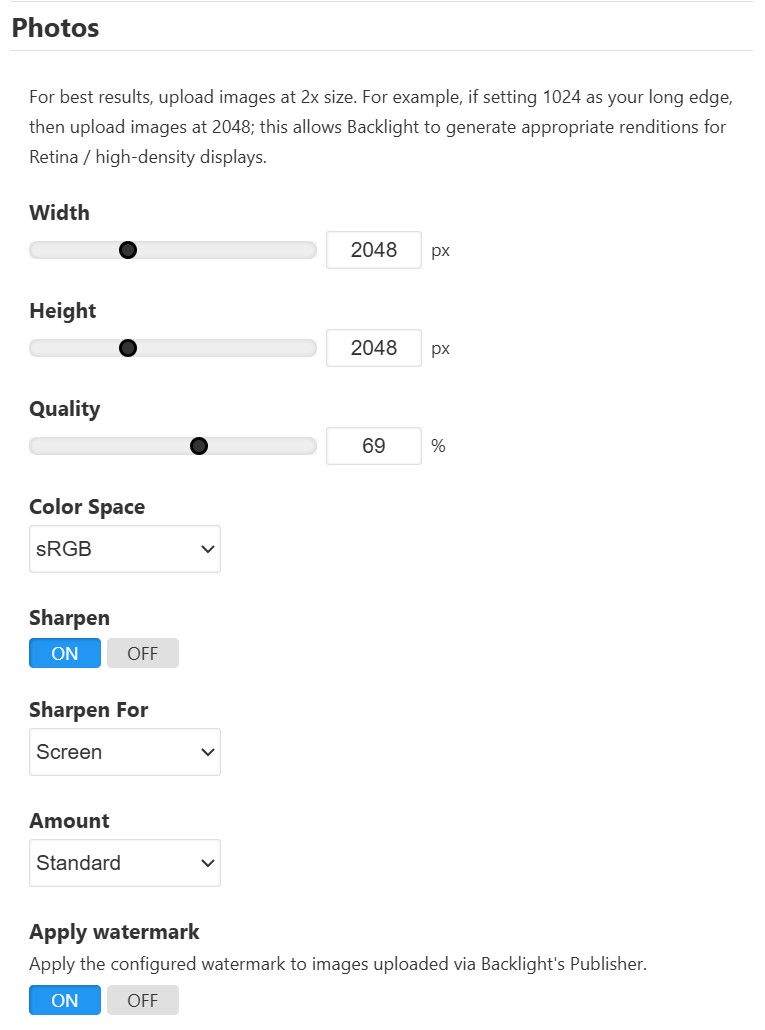
The only mention I can find of Retina in Kookaburra is in setting rendation size in the album template editor. See image.

I suspect that I’ve somewhere set my image presentation size to something other than 2048 and this is prompting Publisher to create the additional renditions. The Pangolin albums contain long edge 2048 images in both the master and photos directories, the latter with the watermark as expected.

There’s no option, and that’s intentional. 1x and 2x image renditions are used to populate the IMG elements’ srcset attribute. This is pretty standard for modern websites, especially those not using dynamic image CDN services, like IMGIX, etc. Without the 2x rendition, images will look soft and out-of-focus on phones, high-DPI screens, etc. Basically, all your photos would look like shit on every MacBook and mobile phone in existence. Basically, all modern displays are 2x or more.

The image size sliders in Kookaburra are essentially your display size, and we background the actual rendition calculations. So if you expect your images to display at 1024, then you will have 1024px renditions in photos and 2048px renditions in photos2x.

There are no “Retina display options” in Kookaburra, because it’s not something that consumers should have to think about. High-density displays are the default, and have been so for years.

If I recall correctly, Pangolin never generated extra renditions. It would just create and deliver very large renditions to everyone, a symptom of it bridging two eras. It was developed in the before times, but found itself living the after times.

A conundrum indeed.

I now understand why Kookaburra produces five renditions of each image per album, which explains the significant increase in both file count and storage required—with Kookaburra for all albums not Fotomoto, my site is now >200 GB and >264,000 files, exceeding my host’s hardware limitations. I had initially blamed my former host, Bluehost, which led me to migrate to IONOS due to a number of critical issues, including excessive cost, storage needs, slow server response times (7-9 seconds vs. 800 ms on IONOS), and poor customer service.

Given this growth with Kookaburra both in terms of total GB and file count, I am now facing escalating hosting costs and the potential need to upgrade to a much more expensive Virtual Private Server (VPS), all for a site that receives fewer than ten visitors daily.

Additionally, I’m struggling to see a real-world scenario where I would need this many image renditions. I personally can’t distinguish the difference on my Windows machine with 27" 4K monitors or my Samsung Galaxy at QHD resolution (550 PPI), similar to Apple Retina technology at 220-440+ PPI but both on a six inch screen. I recognize that faster services like fiber and 5G mitigate issues with image presentation and page load times to a degree.

Regarding image security, my current approach involves multiple layers:

  1. Keeping images at a lower resolution and offering the highest resolution for sale.
  2. Watermarking everything, including thumbnails. (Note: Modern AI-integrated tools like Topaz, Neo, Lightroom, and Photoshop make watermarks surprisingly easy to remove.)
  3. Right-click management.
  4. Other similar measures.
    I understand that all these protective layers, except for the first, are individually easy to compromise, which is a necessary risk for maintaining a reasonable web presence.

In the short term, I have found that I can safely remove all the *2x directories via SFTP without compromising the site to be able to manage storage and file count limitations of my hosting service. I wonder, do the master images serve any purpose once the photos and thumbnails have been generated? Should I consider deleting the photos directories and renaming the photos2x to photos?More experimentation may be warranted if I again bump up against host limitations. In this regard, I am considering a Cron job to monitor and manage my site size in an automated fashion.

In summary, I have a request, a plea if you will: Please restore the option to control image resolution, number of renditions, etc. in Kookaburra. This is the only remaining issue over which we can exert some control, from both a security and, most importantly, file size and file count parameters in this otherwise “best in show” platform.

(As a related experiment, I easily removed an annoying watermark from a restaurant photographer’s image in Lightroom, though I did purchase the non-watermarked version as well.)

Regards,
James.
Maybe not so fast. My initial assessment may have been based upon cached images. This only works if I also change back to a Pangolin template.

Backlight will never upscale your images, so an easy way to short-circuit generating larger images is to upload smaller images.

Using 2048px as a viewing size seems quite large to me as well. If you want 2048px for the long-edge 2x images, then you should set your sliders to 1024px. The sliders represent your desired display size on-screen.

Most helpful and an easy fix for image resolution which also speeds image load times. I also decreased my thumbnail default size from 512 to 256. Thus my site is mostly presenting 512 thumbs and 2048 images.

I am still significantly constrained by total file count hardware limitations by my previous and new hosting service. They have an absolute limit of 264,000 number of files for shared hosting; a number is easily exceed if i use Kookaburra’s 5 renditions. I am still pondering a way to decrease the number of files on my site. Of the 5 renditions, master, photos, photos2x, thumbnails, thumbnails2x; Is there a way to decrease this number, preferably to two? For example, does the master rendition serve any purpose once the other renditions have been created? Any other thoughts on the additional renditions?

Thank you,
James.

@Ben can speak to the uses of master renditions better than I can, but we don’t recommend removing anything manually. Backlight’s various functions expect things to be in place, and we cannot guarantee things won’t break if that’s not the case.

As for reducing the number of renditions, or providing options to do so, that is not an insignificant change, and would require some thought, probably some experimentation, and definitely time. It’s not something I can answer off the cuff, nor make any promises about at the moment.

Frankly, I’ve not heard of hosts have a file count ceiling. Maybe it’s just not something I’ve ever had to think about, because I’ve never come close to hitting it if it existed on my services.

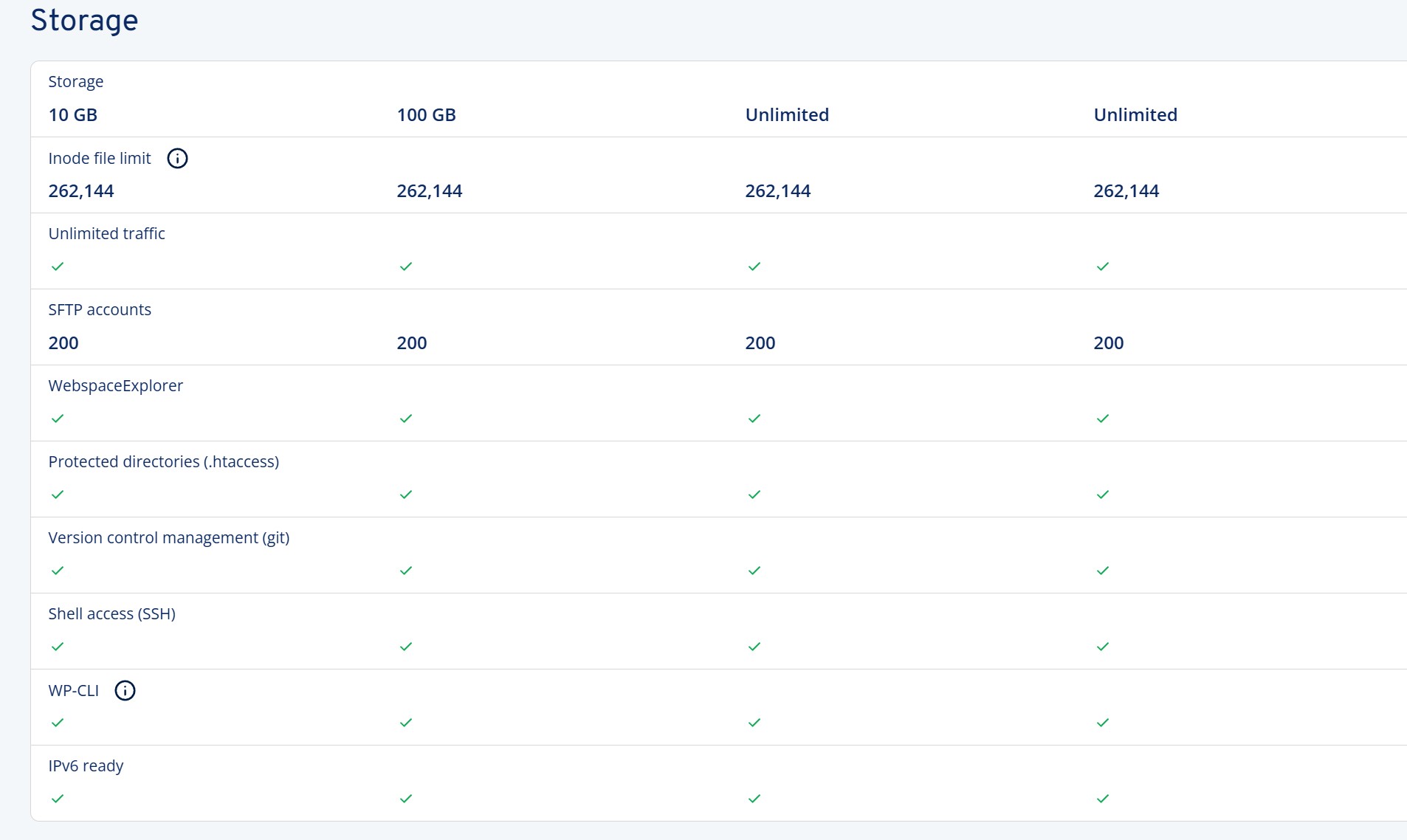
Bluehost has absolute size limits and becomes progressively expensive above 150 GB for base price and they add everything else on. IONOS price includes most everything and has no limit on size for upper tiers, but shared hosting is limited to 262,000 files across all tiers. The alternative is VPS which does not have number of files limits but back to total storage limits for affordable site hosting.

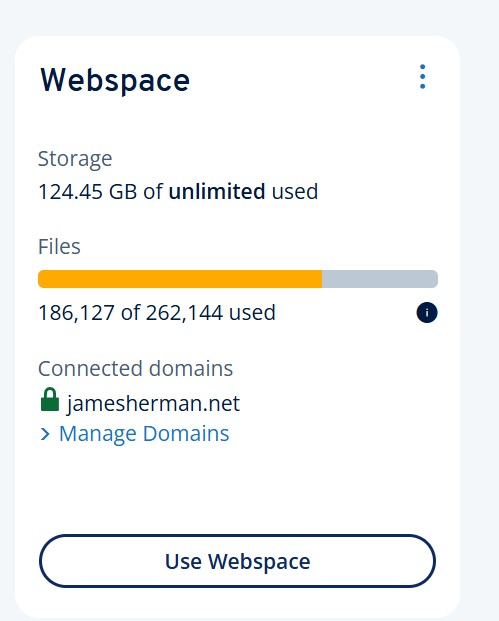
My current capacity and file count and storage after removing *2x renditions and converting back to Pangolin albums. With Kookaburra albums and 5 image rendition subdirectories per album the storage was well over 200 GB and >>264,000 files. Indeed, the site broke until I removed some files.

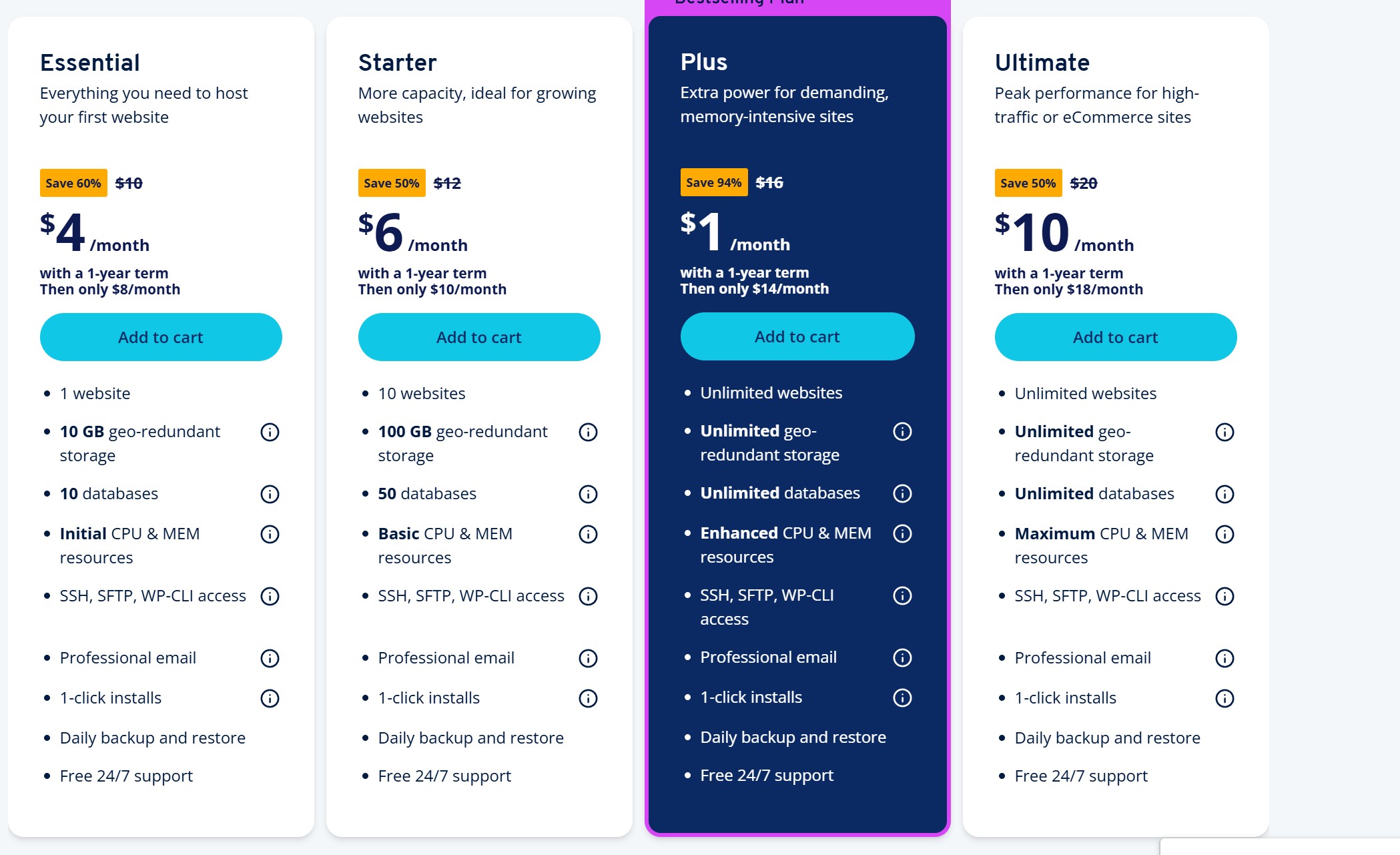
IONOS Shared hosting with second image showing no size limit but file number limits across all tiers.


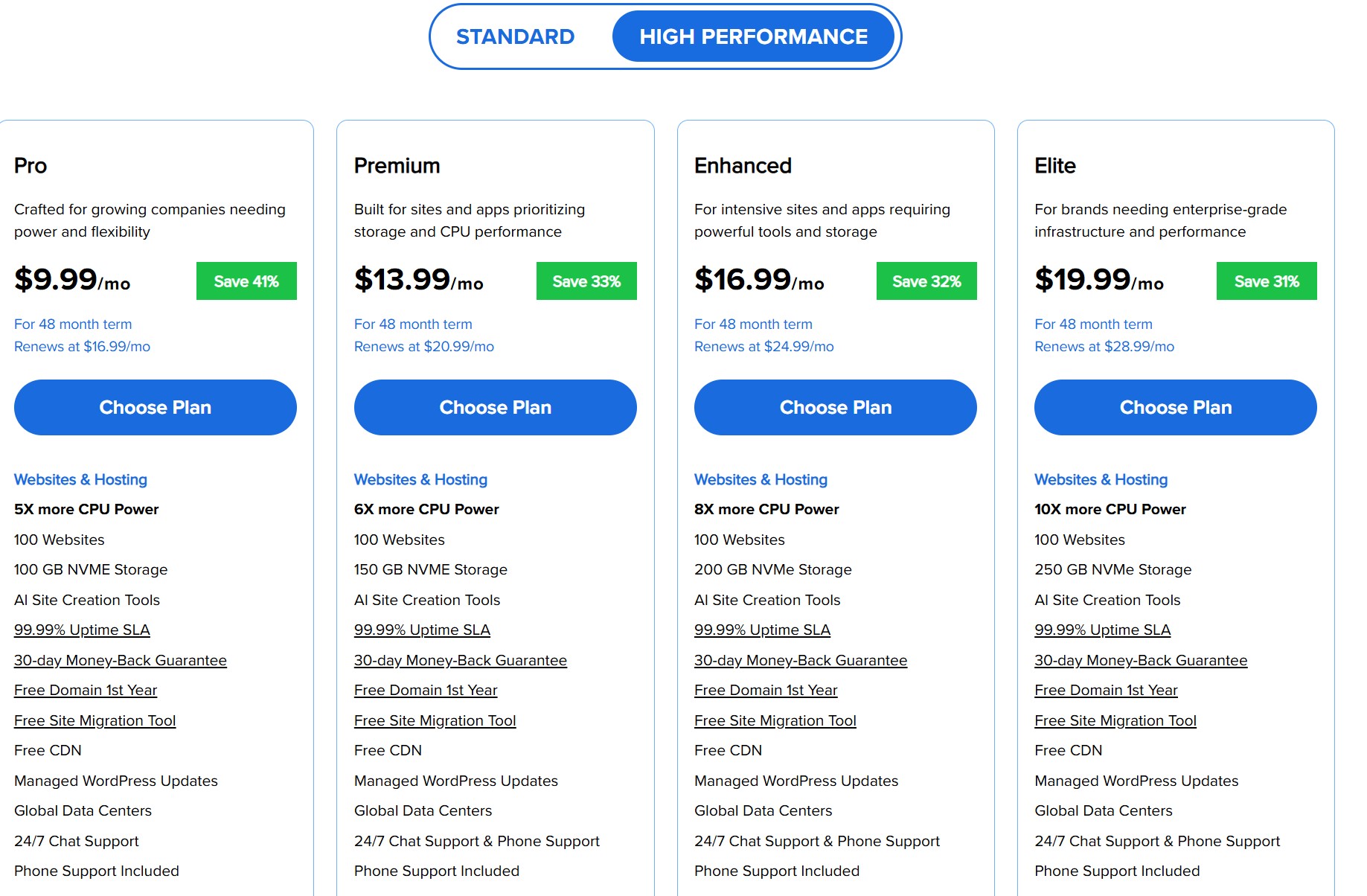
Bluehost Shared hosting with base prices and size limits. On this platform they charge extra for everything including sitelock, DNS, etc. etc. My total per year for 200GB (which I exceeded with Kookaburra) was over $500 per year.

Food for thought.
Thank you again for taking a look at this rather annoying problem
James.

You could eliminate one of those renditions by not using Master files and letting Lightroom create the other renditions

Considering options at this point. I’ve mostly converted back to Pangolin for now to be able to manage disk usage and file count. I am considering splitting my site and placing a portion of the site on my mirror site on my Synology NAS. More to follow when I get it sorted out. I may ultimately be forced to either trim my site, get out my credit card, or both.

Thanks all for your assistance.
James.

We might have another solution for you, but I’m not sure yet.

Master renditions are left because they provide future-proofing in two ways:

  1. Extracting different types of metadata if your metadata templates change
  2. Providing a source for new renditions that may be generated based on changes to your template. We haven’t yet built such functionality but it is on the cards.