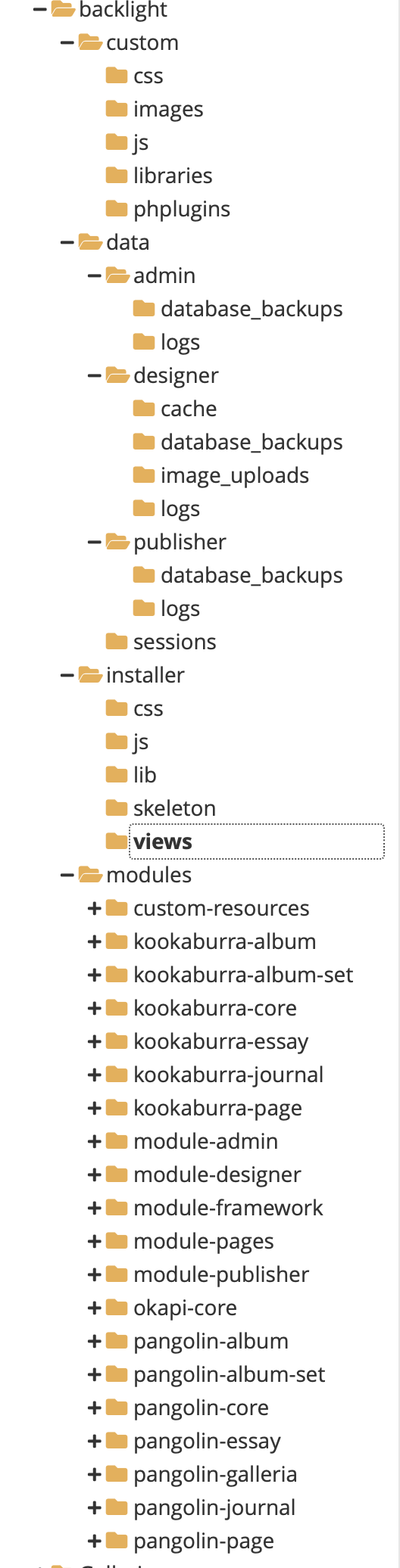
I haven’t backed up my site for a couple of years but need to now - I can’t seem to get to my admin login. I compared my Backlight files with a friend who also uses BL and I seem to be missing some index.html files he has. Is that the problem? I’m attaching a screen shot of some places they are missing compared to his site. I haven’t removed any BL files myself, of course and last time I updated the site it all worked. When I try to just access a URL with a folder (like the admin folder) I get a long msg with lots of deprecation warnings about PHP files. Perhaps I’m somehow out of sync with a PHP update?
The site itself runs fine, I just can log in to make any changes.
I use Justhost as a hosting service - they were recently bought (or merged with BlueHost). This was, of course, not supposed to affect site content, and since I haven’t been on the site for so long, it’s hard to correlate that change with my inability to log in.
Any suggestions would be appreciate and let me know if I need to provide more info to aid in those.
I think that the issue is that the you’re not using the latest version of Backlight. The PHP version of your host is more recent than what your Backlight installation supports.
Check the c-panel on your host to see if you can set a lower PHP version. Go for the lowest that is available. Check if you now can log into Backlight. Then upgrade to Backlight 6 (Get Backlight | Backlight) followed by setting back the PHP version to where it was.
Now everything should work again.
Oh, you can ignore the index.html files. They are not needed/used by Backlight.
Thanks for the reply - my hosting service is running php 8.2 on my site. I can lower it myself to 8.1, anything earlier they have to do for me. They can go all the way back to 5.6 or anything in between. They warned me that going earlier than 8.1 could cause various things to not work, so I’m a little reluctant to start experimenting! I have no idea which version was there when I last updated the site. 8.2 has been out since end of 2022, but I don’t know what the upgrade schedule was at Justhost.
Plus, I would rather not have to buy BL6 as I don’t need any of it’s features and I’m not sure what level of rework I would need to do (I use the Galleria add on) and there is some custom code on my site. Any thoughts about what I might be facing if I did upgrade to 6? I know you don’t know the details of what my site does, there’s nothing too complex or unusual - do upgrades from 5 to 6 usually go smoothly?
Maybe Justhost just screwed up something with their 8.2 installation (I’ve read this happens on occasion) and going back to 8.1 would fix things.
Anyway, given this information would you still go to a pre 8 version of PHP and, if so, what level (you said lowest which would be 5.6)? If it works at 5.6, any reason I couldn’t just leave it? And if I go to an earlier level and my site no longer works at all, would you hthink I could just re-apply 8.2 or 8.1 and at least back to where I have a site others can visit?
As Rod said, upgrading is easy and you shouldn’t face any issues. You can move between different php version as you desire. My host charges if I run an older version and eventually they retire them. Going down to 8.1 most likely doesn’t fix the issue but you can try. Additionally, older versions might have security issues that will never be fixed.
I don’t recommend running you site with an older php version. But you need an older version in order to upgrade! So go down to 5.6 or 6.x version. Do the upgrade and then select 8.2 and your site should be good to go.
Forgive my ignorance, it’s been a while and I was never expert in the BL ecosystem. When you say it will be OK as long as I continue to use the Pangolin modules I’m not sure exactly what that refers to. But my intention is to not change any of the infrastructure of the site as it stands now - I just want to add a new portfolio of images, so it’s purely a content update.
It appears that to upgrade to BL6 I need to purchase it at full price (along with the Galleria module) so $135+$25. There is no upgrade pricing from 5 to 6, correct?
Update on my login problem - just because it’s easy I decided to downgrade the version of PHP on the site from its current 8.2, to the previous 8.1. This I can do myself, any earlier upgrades I would have to have Justhost do.
After changing to 8.1 I can login again! Somehow I think Justhost might have not done a completely clean upgrade to 8.2 (unless someone tells me that BL5 is not compatible with 8,2.
So I think I will just stay with 8.1 and not upgrade to BL6, at least for now.
Again, thanks for focusing me on the PHP environment and the ability to downgrade/upgrade that!
You got lucky! Looks like the issue you had is indeed a change between php 8.1 and 8.2:
Deprecate dynamic properties
Since everything is running right now, update all modules so you have the latest version available to you (Backlight Admin > Backlight Modules > Reinstall All
@rod_barbee mentioned the Pangolin modules. Upgrading is fine. There shouldn’t be any changes for you.
Since you already have Bl5 Galleria, you don’t have to buy it again. it would be just Backlight 6. There was an upgrade pricing in place, but I don’t remember the details. @Matthew would know more.
In your Backlight Modules page you’ll see a list of modules. Some of them are Pangolin, some Kookaburra. If you’ve been using BL long enough, you may also see Okapi modules.
If you are already using Pangolin (I’m assuming you are since you mentioned Galleria), then the update should be seamless. But if you wanted to start using Kookaburra, a redesign would be needed.
Once running your latest available version, you should see the option to upgrade to Backlight 6. Purchasing here, your upgrade discount will be automatically applied to your purchase. After completing your purchase, return to the Backlight Modules page to install the upgrade.
So yes, you still get upgrade pricing and its directly available in your Backlight admin interface.
Hi @bobcornelis, this particular incompatibility was addressed in Backlight 5.1.0, released on January 10, 2023.
Can you visit your Admin > Backlight Modules and see whether there are any available updates for your installation? If there are, then perform the update. You should then be safe to change your site back to PHP 8.2.