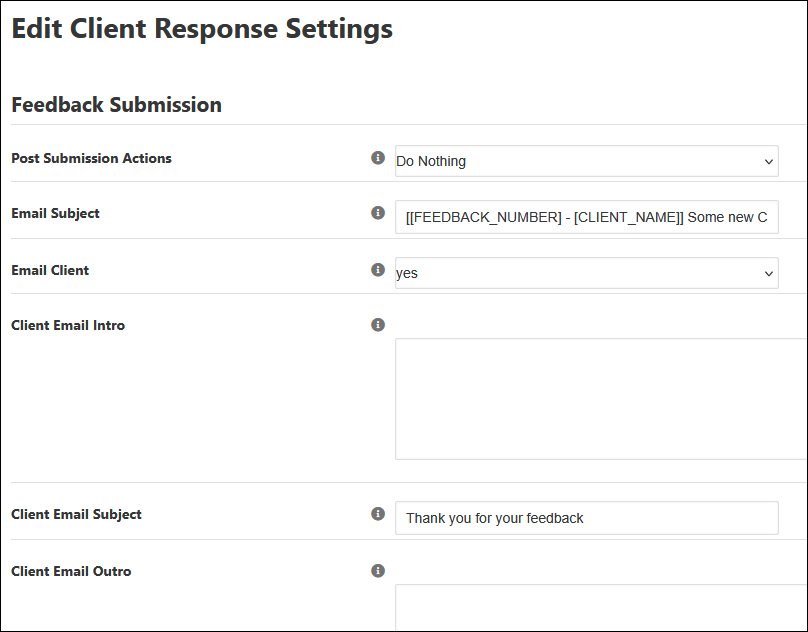
Is there a batch method of reassigning templates to incorporate the Client Response feature in Backlight Publisher.I have loads of albums and changing every single one is tedious. Any way to avoid this?
In Backlight Publisher > Albums
Look for the Assign Templates button at the top.
You still have to assign templates one at a time but it’s much quicker than having to edit each album
You can fake a batch operation.
Let’s say you have a template, “My Album”.
First, clone the album template to create “My Client Response Album”. Edit the clone to enable the client response features.
Next, clone “My Album” again, to “My Album (backup)”. You might also want to download a copy of the template.
Now, delete the original “My Album”. Don’t worry about losing it, you have the backup. During deletion, you will be asked to reassign all affected albums to a new template. Choose “My Client Response Album”.
You now have replaced all albums with the CR version.
Feel free to rename the backup template back to the original name, “My Album”.
1 Like
Thank you Matthew,
I don’t know if I can swing this, but I’ll try…
It’s honestly pretty simple. Here’s a video showing the same process in the context of replacing Pangolin templates with Kookaburra en masse.
Thanks, Matthew,
I guess I’ll implement the Client Response feature as needed, for now. But, could I use this method to update the whole site to Kookaburra? What would be the obvious advantage to doing this?
one disadvantage (for now) is that there is no Client Response module for Kookaburra yet. So any CR albums you have would need to remain Pangolin
Good to know. Thanks, Rod
While in client response: is it possible for the client to get a copy of the message that was sent to me, indicating his selections?