Just curious: is there a way to tell when a file was uploaded online? On this site, https://pideja.ca there are files dating back to 1989, but have been uploaded probably since around 2013. But can I precisely tell?
I don’t see a way to find this information in Backlight. Might be a cool feature to have though.
But you can look in the database.
When you get in, click on “Publisher” in the Change Database box on the left. Then click on “photo” in the Publisher box that appears.
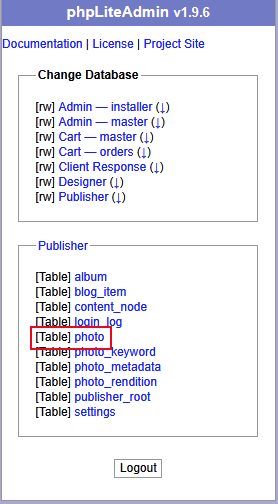
There is a column for Filename where you can sort on the filename. At the far right of the table is a column titled “created.” This appears to be the upload date (I just added an album of images to a test site and the “created” date/time coincides to the upload date/time).
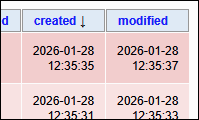
You’ll probably have to scroll horizontally to get to the “created” column. There’s a little bar at the bottom of the window.
I don’t know if you can use the LUA metadata token to program an upload date into your metadata.
If you’re handy at using Excel or SQL databases, you can export the “photo” table (as CSV for Excel) and then save it on your computer.
I was just messing with this and found that if you want to export as CSV, then in the Options section, set Fields terminated by to a comma.
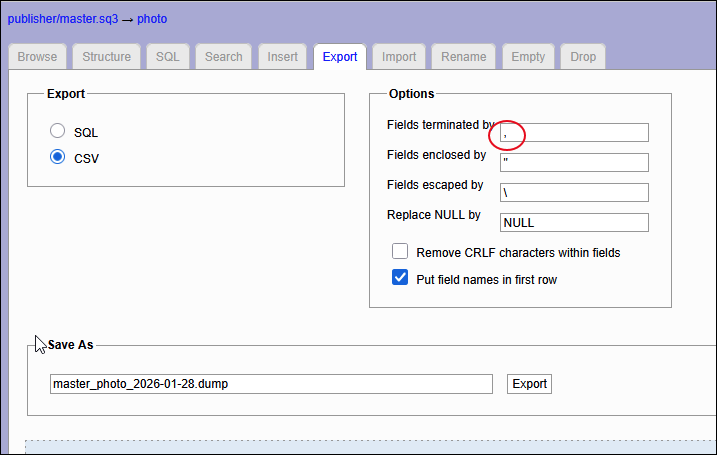
This actually worked pretty good. After opening in Excel, I could drag the columns to show only the relevant information, such as filename, url of the album, and created (uploaded) date.
I’m in, but it says “This page is intended for technical troubleshooting and maintenance.
Please contact TTG customer support for the phpLiteAdmin password.” I tried my Backlight password, to no avail.
What should I use?
password is admin
Thanks, Rod, it works great. But it is strange that not all the uploads are listed. And these lists are not in alphabetical, chronological or in any other order, as far as I can see. In fact, some entries (shows, in this case) are not even grouped together. As an example, one show has some images listed, then further down the listing, we find more images from that show grouped elsewhere. Might be two different uploads. Anyway, I made an Excell spreadsheet of it, for further analysis.
you can sort the columns in the database if you want. Probably easier to do that in Excel though