Photos Not Displaying After Backlight Update 6.5.0
Hello,
After updating Backlight to version 6.5.0, I noticed that my photos are no longer displayed on pages using the “Kookaburra Essay” Album Template.
Before the update, these pages worked correctly and all photos were displayed as expected. I have not made any changes to the Page Content or the album settings. The existing album data is still present in the page content, for example:
However, the photos are no longer visible on the published webpage.
Example webpage
This page uses the Kookaburra Essay Album Template and illustrates the issue.
Expected behavior
The photos should be displayed in the album grid as they were before the Backlight 6.5.0 update.
Actual behavior
The album grid no longer displays the photos, even though the album data and image references are still present in the Page Content.
Could you please investigate whether something changed in Backlight 6.5.0 that affects the Kookaburra Essay Album Template or the way album images are loaded?
Any advice on how to resolve this issue would be greatly appreciated.
6.5.0 refactored the essay code a bit, and we yesterday found a bug introduced in that refactor. It’s been patched on our side. I’ll see if we can get that fix out ASAP.
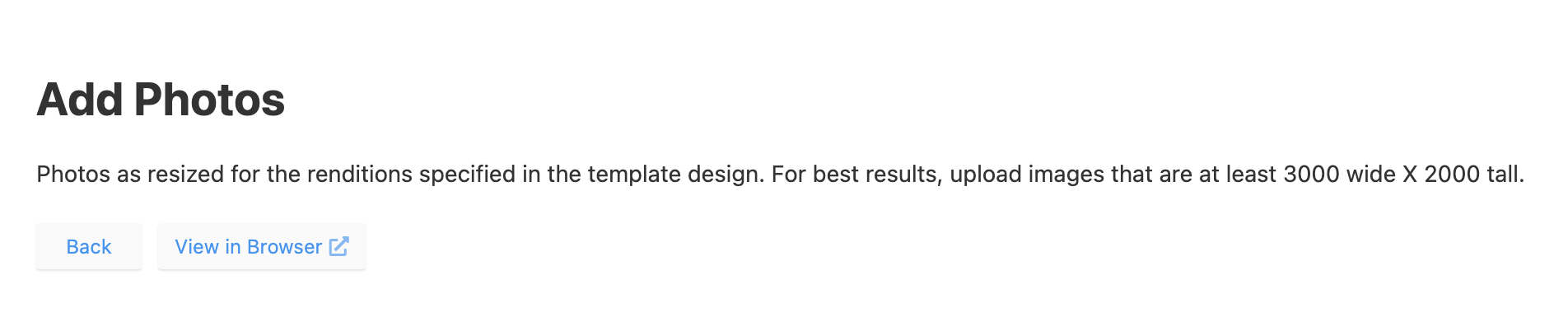
I’m trying to add photos to an album, but I can’t navigate to the correct folder (see screenshot). The only options available are “Back” and “View in Browser”.
The problem was resolved after clearing the cache and cookies in Google Chrome. Thank you very much for all your support and helpful tips. I really appreciate it.