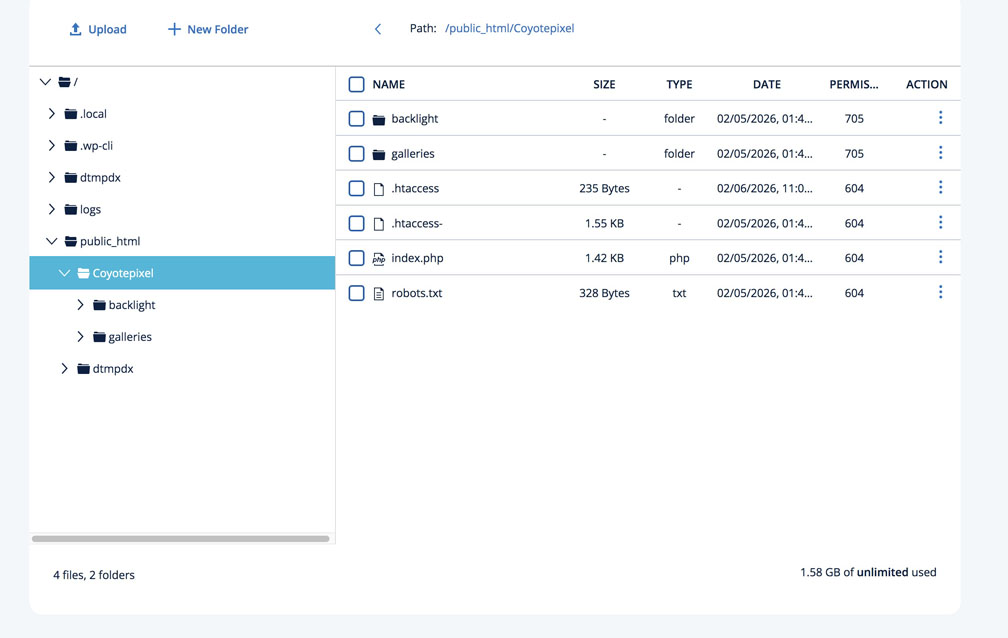
Greetings. I had my new host, Ionos, migrate from my previous host, my folder with all the galleries and backlight 5 files to a folder they created for me. The domain name takes 7 days before we can link it to my new Ionos folder.
He set up a temporary link to my Backlight, but the site doesn’t seem to be working. Is there something I should update with the new host, eg; index php, .htaccess, or whatever? The tech mentioned that installation of Backlight 5 into the old host may have created something specific to that host?
I noticed that in the previous host backlight folder a .htaccess but in the new folder, two of them.
The original and a second.
He won’t be back in to work until Monday, but if I could get some info for him, I’d appreciate it. I can’t seem to find the email with the temporary domain and it’s not listed on Ionos’s domain control panel. Otherwise, I’d send along the link. No error message that I can remember.
There should be a .htaccess file in the backlight/ folder. There is also one in the root of the site. It’s alongside the index.php file and the galleries/ and backlight/ folders. These are two different .htaccess files and they need to stay in their original locations.
Yep, no .htaccess file in the root folder of the new host. Is that something I can create or did Backlight create that? Can I import the old one from the previous root to the new root or does it need to be recreated?
Thanks, Rod
Couple of questions regarding migration to another host.
It is OK to migrate all within the current root folder to new host. eg: Backlight, Galleries, .htaccess, index.php and robots.txt (whatever that is)? Do this instead of reinstalling Backlight 5.
Once I point Lightroom API Url to the new site, will the old API Key still work? If not, how do I create a new API Key?
My new host migrated these for me. My domain name has not yet transferred so he created an in-house link which as I mentioned, won’t open the site. I noticed that there are 2 .htaccess files, the old one with a dash(-) added (1.55KB) and a new .htaccess file. Don’t know why he added that. He’s in again on Monday. I’d like to know what’s the possible solution before I talk with him. Could it be that the .htaccess- is the problem?
As Rod mentioned, Use the .htaccess file that was included in the original Backlight package. Renaming a .htaccess to .htaccess- will prevent it from being used. Maybe your admin prevered to use their default file. Try renaming .htaccess → .htaccess-newhost and .htaccess- → .htaccess. Does this change anything?
1: Yes, that’s what I did when I migrated from Bluehost to ionos.com. I just moved all files and directories.
2: You just need to change the URL. If you’d like to change the API Key, you can do it in the Backlight admin settings.
Daniel,
I looked back at my emails for the temp url that he gave me and couldn’t find it. I also looked on my Ionos control panel at the Domain Name page for the temp. He must have deleted it. I’ll have to try that on Monday when I talk with him. He mentioned that he’s not used to migrating such apps other than wordpress apps.
Thanks for the reply! I’ve deleted all but one album (kept copies in lightroom) and am downloading my site to my own computer along with the original .htaccess file in case I have to start over w/o his help.
I too, have now migrated from Bluehost, complete divorce, to IONOS. They copied my site and associated db then set up a temporary link to check the site is intact. I then migrated my DNS to IONOS which took only 5 days and my site was down muchost of that time as BH removed the SSL certificate. IONOS then easily helped me add my Google Workspace MX records and link the now IONOS DNS to my site directory. All is well with the migration.
The only small issue I am having is that I am still working through getting PuTTY to work. IONOS assures me my shared hosting contract includes access and the technician was able to sign on on his end. It appears the issue is with my version of PuTTY installed on my Windows machine. MTF.