Can anyone please advise?
Currently building a test site before going live. It’s on line as a sub-domain of my domain with random pics in galleries and it basically works, and just needs expanded, fine tuned and completed.
I have a SSL certificate on the site, and the redirect in backlight sends the visitor to the secure site https://“testsite”.photo
If I type www.”testsite”.photo into the web address bar the address is automatically expanded and I am redirected to https://www.testsite.photo but an error message “can’t open a secure connection to the site” is returned by safari browser on Mac OS and iOS.
I can type the full secure address https://“testsite”.photo, http://“testsite”.photo or even just ”testsite”.photo and the site opens.
My problem is that most web users will automatically just type “www.” in front of the site name and probably won’t have a clue about https:// etc. and will not be able to open the site.
However on other sites , for example on Backlight’s own site, www.backlight.me is redirected to https://backlight.me and it opens fine.
As I see it, there are four possible areas causing this problem.
Me doing something wrong in Backlight - very likely.
Something wrong in backlight - very unlikely.
Me doing something wrong in my host’s interface - very likely
Something inherently wrong at the host - very unlikely.
If anyone has any ideas, please put me out of my misery?
There might be an option in the cpanel of your web host where you can enable redirect from www.yoursite.photo to yoursite.photo.
Otherwise, adding following few lines of code to your /.htaccess file should to the trick:
This text will be hidden#Force non-www:
RewriteEngine on
RewriteCond %{HTTP_HOST} ^www.example.com [NC]
RewriteRule ^(.*)$ https://example.com/$1 [L,R=301]
Your domains point at various locations depending on the DNS configuration.
For example, you might have two DNS entries such as:
A    domain.com    0.0.0.0
A    www           0.0.0.0
Which simply dictates that the address should go to the same IP address, regardless whether www is included or not. If I wanted to, I could point www at a different server, and use it to serve an entire different website. Typically not a thing that’s done, though.
The server with that IP address then has its own configuration. This dictates where to send each of the URLs as it receives them. So you might have a .conf that includes instructions like:
… and this sends both versions of the URL – with and without www – to the same folder, which contains the public-facing website.
You could have separate .conf files that specific different locations, and then have separate websites for the www and non-www version of the address (though that usually isn’t done).
And then there’s the SSL certificate. We do SSL through Let’s Encrypt using certbot; when we run certbot to create the HTTPS version, we tell it to redirect all HTTP requests to HTTPS. We could opt not to do that, but it’s generally better to do the redirect. The redirect can also be handled in the .htaccess rules – probably other places as well – if something like certbot isn’t handling it for you. For example, Backlight can do it for you via .htaccess. For The Turning Gate, though, I don’t need Backlight to do it, as it’s already being done.
Obviously, this is not a tutorial. But I hope that serves to explain things well enough to clear up some of your confusion.
The info above is mostly for context, and I wouldn’t consider it actionable unless you manage your own server. You might want to check in with your host, else just try using Backlight’s redirect via the Settings page.
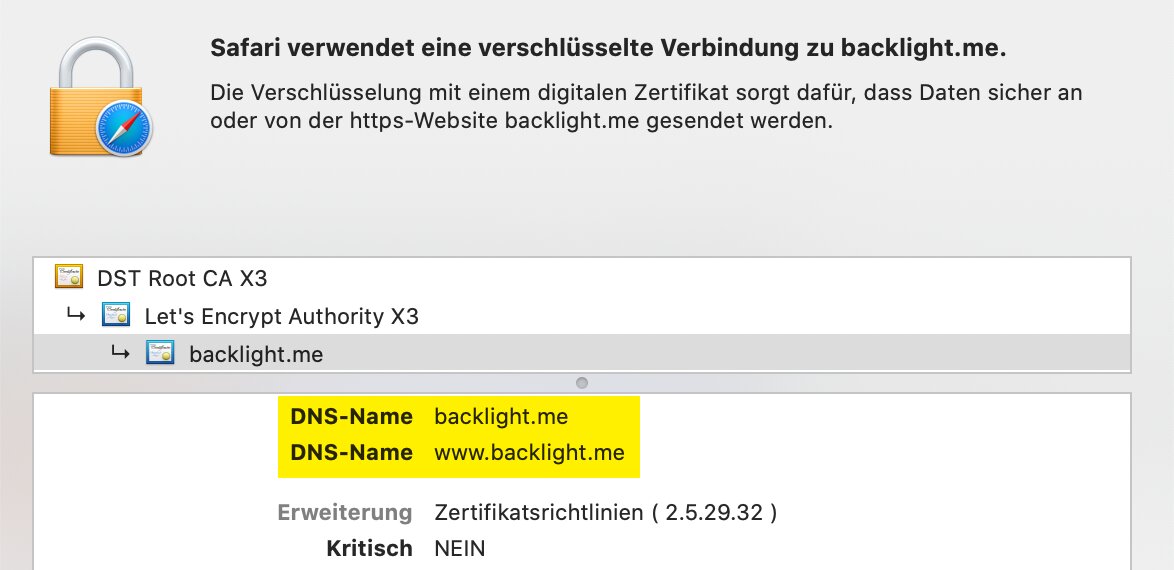
While looking through this thread I noticed that the use of a SAN certificate has not yet been explicitly mentioned.
If you want to redirect from www.example.com to example.com, both entries must be in the same certificate = SAN Certificate…
If you have created two certificates - one per domain - this will never work with all browsers (browser security)
Hope this helps and clarifies
Dr.Watson
I’ve had a look at your domain, and all roads lead to Rome: every variant of test, www.test, www, and non-www point to the same IP. Multiple those out with http and non-https variants and you’re looking at eight combinations.
That raises the question of whether you’re trying to over-complicate things. I wouldn’t bother spending time on getting SSL or www redirects working for a temporary URL. Just stick to get it working correctly on the domain you intend your production site to work on.
Can you share with us the exact URL you’re trying to get this working on, and which URL is behaving in what way and how you’d expect it to work? That will help us to provide concrete advice.